Most people first meet AI in a chat box.
That makes it easy to think the work is the conversation: ask a question, get an answer, copy the useful parts, and move on.
That is one way to use AI. It is not the most useful way.
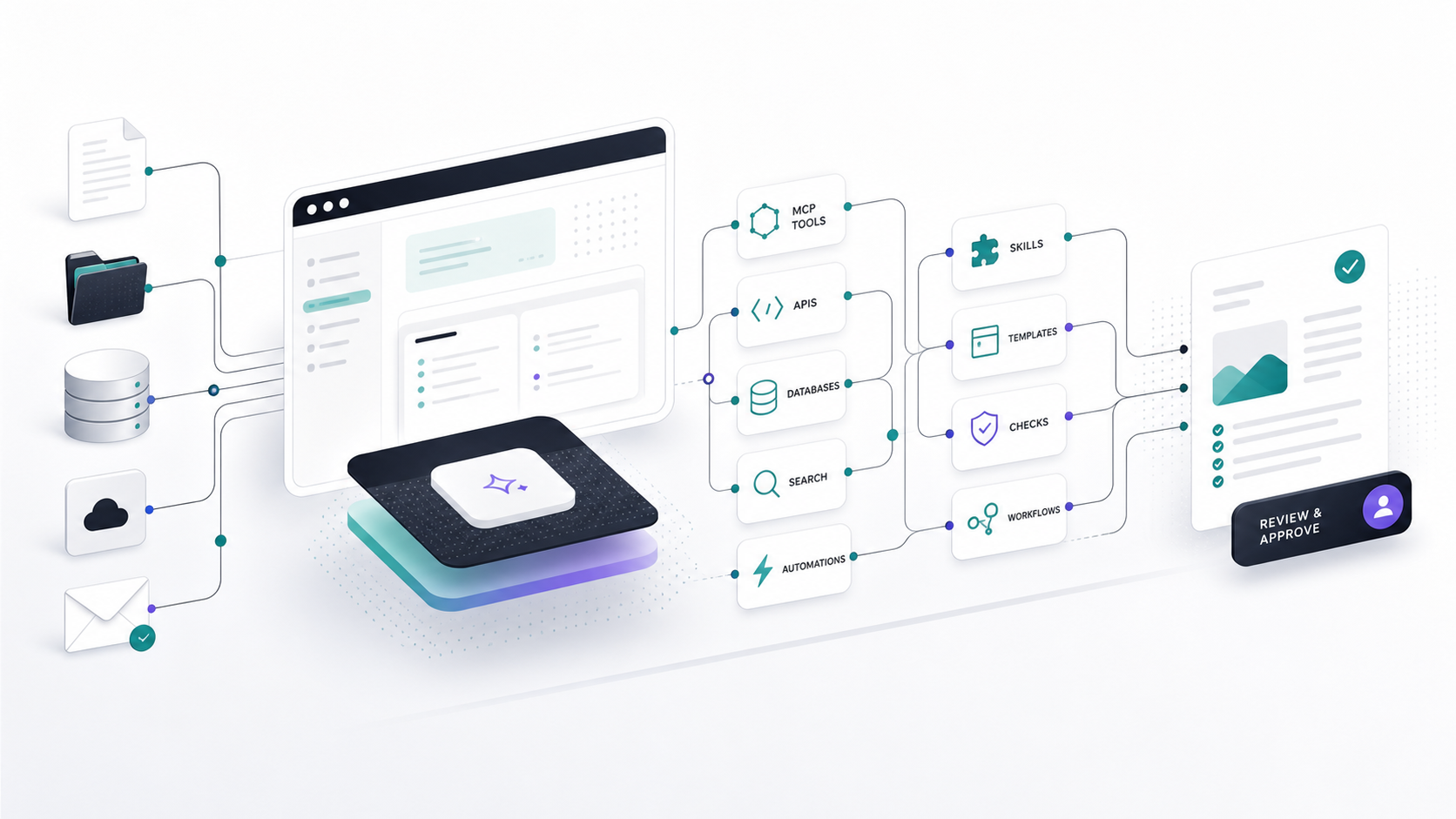
The more practical version starts when AI is connected to the place where the work already happens: the browser, the local folder, the repo, the source files, the notes, the APIs, the templates, and the review steps.
That connected environment is the harness.
A harness is the layer around the model that gives the work structure. It defines what context the agent can see, what tools it can call, what data it can use, what files it can change, what output format it should produce, and what a human needs to review before anything leaves the system.
This matters because real work is rarely just writing a paragraph. Real work usually means finding the right source material, checking data, comparing options, formatting an output, preserving evidence, and deciding what is safe to send, publish, deploy, or use.
AI becomes more useful when those pieces are connected.
The Tool Is Not The Whole System
Codex, Claude Code, Cursor, Windsurf, Grok, Antigravity, and similar tools all point toward the same shift: AI is moving from a standalone answer box into a working environment.
The specific tool matters, but it is not the whole system.
The system is the harness around it:
- the files and folders that hold the source material
- the tools, APIs, databases, and web sources that bring in current data
- the MCP servers that expose capabilities safely
- the reusable instructions that define how work should happen
- the templates that turn output into artifacts
- the checks that catch errors
- the review points where people keep responsibility
That is the part worth understanding.
A chat box can help draft, summarize, explain, and brainstorm. A harnessed workbench can help produce something reviewable: a report, an edited page, a proposal, a checklist, a dashboard, an article brief, or a validated file.
A Harness Starts With The Work
Useful AI does not start with the model. It starts with the work.
What is the manual process? What comes in? What gets checked? What repeats? What breaks? What data is needed? What output has to exist at the end? What decision still belongs to a person?
Once those pieces are visible, the harness can be designed around them.
For a website workflow, the harness may include the HTML, metadata, llms.txt, sitemap, robots rules, source notes, browser checks, and publishing rules.
For an AI search visibility workflow, the harness may include keyword data, SERP results, AI Overview citation checks, crawler access review, competitor comparisons, and a report template.
For an outreach, research, or market-mapping workflow, the harness may include profile data, company pages, CRM records, enrichment APIs, public websites, and approval rules.
For an internal process, the harness may include databases, source documents, spreadsheets, approval rules, output templates, and validation checks.
The point is not to connect everything. The point is to connect the pieces that make the work more accurate, repeatable, and inspectable.
MCP Gives The Harness Data And Tool Access
MCP, or Model Context Protocol, matters because it gives AI workbenches a clean way to connect with tools and data sources.
Without tool access, the model can talk about a workflow. With the right MCP tools, the agent can participate in the workflow.
That distinction matters.
DataForSEO is one useful example, especially for AI search and GEO work. But the same pattern applies much more broadly. A harness might connect to a CRM, analytics database, product catalog, LinkedIn-style profile source, enrichment API, email system, internal document store, public website, or controlled scraping workflow.
The common point is access to real data.
A practical AI-search or GEO workflow should not only talk about visibility in general terms. It should be able to use real signals: keyword data, SERP results, AI Overview citation data, LLM response data, domain intersections, and crawler visibility checks. A practical market-research workflow might need company profiles, hiring signals, website copy, contact records, funding data, or CRM history. A practical operations workflow might need database rows, tickets, spreadsheets, logs, or internal docs.
If those capabilities are exposed through an MCP server, the harness can let an agent use them in a controlled way. The agent can work from the local project, read the relevant files and notes, call the right tools when needed, and turn the findings into a reviewable artifact.
The workflow becomes concrete:
- The site files, notes, and source material live in the local workspace.
- The agent reads the relevant pages, metadata, root files, and constraints.
- MCP tools provide the needed external data.
- The agent compares that data against the source material and strategy.
- A template turns the findings into a report, brief, or article section.
- Checks confirm that claims, links, and outputs are reviewable.
- A person decides what gets published, sent, changed, or ignored.
That is not a generic AI demo. It is a harnessed workflow.
Data Makes The Work Different
This is where many AI articles stay too shallow.
It is easy to say that AI can help with SEO, GEO, content strategy, or research. It is more useful to show how the work connects to evidence.
For AI search visibility, the useful questions are specific:
- Is the site crawlable?
- Are the important pages indexable?
- Does the content answer real buyer or reader questions?
- Does the brand appear in AI-generated answers?
- Which competitors or sources are cited instead?
- Are there gaps between traditional search visibility and AI visibility?
- What should change on the site, and what evidence supports that change?
Those questions need data, not just language.
DataForSEO is a strong example for search and GEO, but it is not the point by itself. The point is the data layer. Practical AI is not just asking a model to write about the work. It is connecting the model to the APIs, databases, public sources, files, tools, and checks that make the work real.
Skills Capture The Repeatable Part
Once a workflow repeats, it should not depend on remembering the perfect prompt.
That is where skills matter.
A skill is reusable workflow knowledge. It can tell the agent what to inspect, which tools to call, how to format the output, what privacy boundaries matter, what checks to run, and when to stop for review.
For an AI search visibility workflow, a skill might say:
- inspect the site structure, metadata, root files, and machine-readable context
- check crawler and indexing basics before making content recommendations
- use approved MCP tools for search, profile, database, or visibility evidence
- separate measured findings from interpretation
- produce a short report with sources, gaps, and next actions
- do not publish, email, run paid research, or change accounts without approval
That is not just a prompt. It is process captured in a form the harness can reuse.
Templates Turn Output Into Artifacts
The output should not stay trapped in chat.
If the work is a site audit, the output might be a report. If the work is content strategy, the output might be an article brief. If the work is a proposal, the output might be a client-ready document. If the work is website maintenance, the output might be an edited page plus a build check.
Templates matter because they make the output easier to inspect and improve. They also make the workflow easier to repeat.
A useful template answers practical questions:
- What was reviewed?
- What data was used?
- What did the agent infer?
- What is the recommended action?
- What evidence supports it?
- What still needs human review?
That is how an AI answer becomes an artifact someone can use.
Review Is Part Of The Harness
Human review is not a weakness in this kind of workflow. It is one of the safety features.
The agent can search, compare, summarize, draft, format, and validate. But a person should decide what gets published, sent, deployed, or trusted.
That boundary is especially important when a workflow touches client work, paid APIs, email, search visibility, brand reputation, or public claims.
The goal is not to pretend the system is fully autonomous. The goal is to move routine work into a structure where people can spend more attention on judgment.
What This Means For Practical AI
The useful question is not only "Which model or tool should we use?"
The better question is: what harness surrounds the work?
Where is the source material? What APIs provide the data? What does MCP expose? What databases, profile sources, public pages, or APIs are allowed? What skills define the workflow? What template shapes the output? What checks run before trust? What artifact survives after the conversation? Where does a human approve the next step?
That is the practical shift.
AI becomes useful when it is connected to the real work: folders, browsers, files, APIs, MCP tools, evidence, templates, review, and artifacts people can actually use.
The future browser is not just a place to read the web. It is becoming a workbench where AI, data, tools, and human judgment meet.
Frequently Asked Questions
What is an AI workbench harness?
An AI workbench harness is the structure around an AI model or agent. It connects the system to files, tools, APIs, MCP servers, templates, checks, and human review so the output can become a usable artifact.
Is this only about Codex?
No. Codex is one example of this pattern. The broader point applies to any agentic workbench or coding assistant that can operate around files, tools, browser context, APIs, and reviewable outputs.
What is MCP in practical AI workflows?
MCP is a protocol for connecting AI systems to tools and data sources. In a practical workflow, MCP can expose services such as search data, databases, browser tools, file systems, or internal APIs so an agent can call them in a controlled way.
What kinds of data can a harness use?
A harness can use data from APIs, databases, spreadsheets, public websites, profile sources, search tools, CRM systems, analytics platforms, document stores, or controlled scraping workflows. DataForSEO is one example for SEO and GEO, but the broader pattern is connecting the agent to the data source the work actually depends on.
Where do humans fit in?
Humans decide what gets published, sent, deployed, or trusted. The harness can prepare the evidence and artifact, but review remains part of the workflow when the output has external consequences.
Want To Test A Workflow?
If you are trying to understand whether a workflow can become more inspectable, use the Ask RafalAI form. Share the task, the source material, the tools or data involved, and what output you need at the end.
RafalAI can help think through the structure: what belongs in the folder, what should come from an API, where MCP might help, what should be templated, and where human review needs to stay in the loop.